Monday, 30 November 2015

Task 8 - Evaluation

Task 8 - Evaluation

Gain feedback by allowing gamers to explore or view your environment and write an evaluation of your project. Use your blog posts to identify the strengths and weaknesses of your design process. Try to establish whether or not your finished product has achieved the aim of the project. Take into consideration anything said by interested parties.


Remember that you are trying to create a 3D environment to a technical quality that reflects near-professional standards following industry practice, showing creativity and flair and working independently to professional expectations.

Task 7 - Presentation

Task 7 - Presentation

Publish your game environment prototype as an executable file that can be explored. Include screen shots of the completed game environment prototype on your blog. Include some captured footage and upload this to YouTube and publish it on your blog. Record the whole of your production process within your production log.

OR

Render your flythrough sequence as an uncompressed AVI file, upload this to YouTube and publish it on your blog. Record the whole of your production process within your production log.

Remember that you are trying to create a 3D environment to a technical quality that reflects near-professional standards following industry practice, showing creativity and flair and working independently to professional expectations.


This screenshot shows my dungeon after I textured it. 


This screenshot shows a zoomed in version of my dungeon.

Task 6 – Prototype/Flythrough Build

Task 6 – Prototype/Flythrough Build

Construct your environment within the 3D game engine, load in the relevant textures and experiment with the lighting and POV needed for the environment. Record the whole of your production process within your production log.

OR

Construct your environment within NewTek’s Layout, load in the relevant textures and experiment with the lighting and camerawork needed for the environment. Record the whole of your production process within your production log.


Remember that you are trying to create a 3D environment to a technical quality that reflects near-professional standards following industry practice, showing creativity and flair and working independently to professional expectations.

Task 5 – Environment Build

Task 5 – Environment Build
Use your design pack to build your environment within NewTek Modeler. Pay careful attention the specification required by this assignment i.e. that the resulting environment will need to function within a 3D game engine or within LightWave’s animation application Layout. The difference between the two is that one will be real-time and the other non-real-time rendered. Make sure that you save your files by date and incrementally. Ensure that you surface elements as you work, ideally as UV maps (photographic and preset textures can be applied later, but you may wish to experiment by previewing your work within NewTek Layout).
Once completed, prepare your model for export, considering both the meshes and surfaces/UV maps. This may involve rationalising and simplifying your models. Record the whole of your production process within your production log.
Record the whole of your production process within a production log that can be posted to your blog at the end of the assignment. You may need to source additional reference imagery and textures as the modelling progresses.

Remember that you are trying to create a 3D environment to a technical quality that reflects near-professional standards following industry practice, showing creativity and flair and working independently to professional expectations.


This screenshot shows the first stage of my dungeon design. I have built walls around the castle to mark the boundaries of the dungeon and will begin to develop the interior dungeon. 


This screenshot shows a nearly finished build of my dungeon design.


Task 4 – Legal and Ethical Checklist

Task 4 – Legal and Ethical Checklist

Ensure that you have carried out a legal and ethical check of your proposal and provided appropriate evidence of this.


Remember that you are trying to generate thoroughly thought-through ideas for a 3D environment showing creativity and flair and working independently to professional expectations.


Task 3 – Design Pack

Task 3 – Design Pack

Plan out your environment carefully by producing a design pack. This will need to include a map of your game environment and details of each element to be created. You may want to use a combination of hand and computer-generated 2D and 3D sketches, diagrams, photographs and texture samples. Remember to design your environment using a modular approach wherever possible. Adaptable modules will allow you more flexibility and more fluid gameplay within the game engine or LightWave’s animation application Layout.

Remember that you are trying to generate thoroughly thought-through ideas for a 3D environment showing creativity and flair and working independently to professional expectations.


This image shows roughly what I want the corner of my walls to look like. The tower will be round instead of square and the walls will be slightly higher. 


This shows what I want the walls to look like. I want my castle walls to look reinforced, while also looking old.


This image shows what I  want my inner walls to look like. I want a small staircase leading up to the castle walls and a doorway at the top and bottom of the towers so that I can easily enter or exit them.


This tower design is what I want my tower to look like. I want there to be windows where archers would normally shoot out of, and a cone shaped roof to make it look more reinforced. 


This image shows what I find the texture of my walls to look like. It is a very plain looking wall but also looks really reinforced to make the walls look stronger.


This image shows what the walls of the dungeon are going to look like. The texture is very dark and spooky which makes the dungeon an even more scarier place to be.


This screenshot shows the design plan for my castle dungeon. 

Task 2 – Setting Research and Ideas Generation

Task 2 – Setting Research and Ideas Generation
Choose one of the following interior settings:

Setting
Theme
Castle
Set in a prison beneath a castle during the medieval period. The setting is dingy, damp, dirty, dark and oppressive. There is evidence of torture and interrogation.
Spacestation
Set in the distant future, but designed like a 1970s vision of the future, featuring over-the-top, dated futuristic technology. It is clear that something has caused the crew to leave suddenly.
Hospital
Set in a 1940s era American hospital. US soldiers returning from Japan have brought back a mysterious, but deadly virus which has pushed the health system to breaking point.
Fantasy
A surreal house in which all of the contents are notably not to scale. For example, the living room sofa is massive and requires stairs to sit on it and the TV is minuscule and needs a magnifying glass to view it, etc.

Collect together a wide range of visual and written research about your chosen setting and consider the brief you have been set carefully. Present your findings on your blog so that you can easily work from them. This is where you will generate ideas and give yourself essential reference material to work from. Ensure that you are meeting the requirements of the brief from the start. Remember to cite all sources.

You must consider the timescale available and plan your project accordingly.


Remember that you are trying to generate thoroughly thought-through ideas for a 3D environment showing creativity and flair and working independently to professional expectations.


I chose this example of a castle because it looks small, so I could base the design of my keep on this castle.


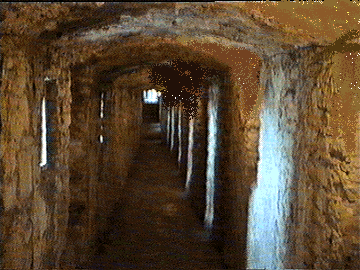
I chose this image because there is very little light in the dungeon, to make it more mysterious and more like a dungeon should be, which is what I want my castle to be like.


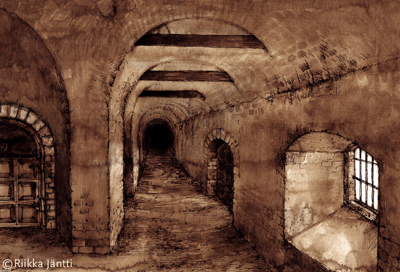
I chose this image for my castle because the corridors look haunted and gloomy, which is what I want my corridors to look like when designing my castle dungeons.


I chose this image because it looks horrifying and haunting which is what dungeons should look like, which is why I will be basing my dungeon around dungeons like these.